Expand Menu
Figma Tool for Content and Metadata Annotations & Extraction
An automated tool to extract content from Figma designs and define metadata for content management.
My Role
Designer, Developer
Timeline
4 weeks
Project Cover of
The Product
An Multi-step Figma Tool for extracting Content and Metadata

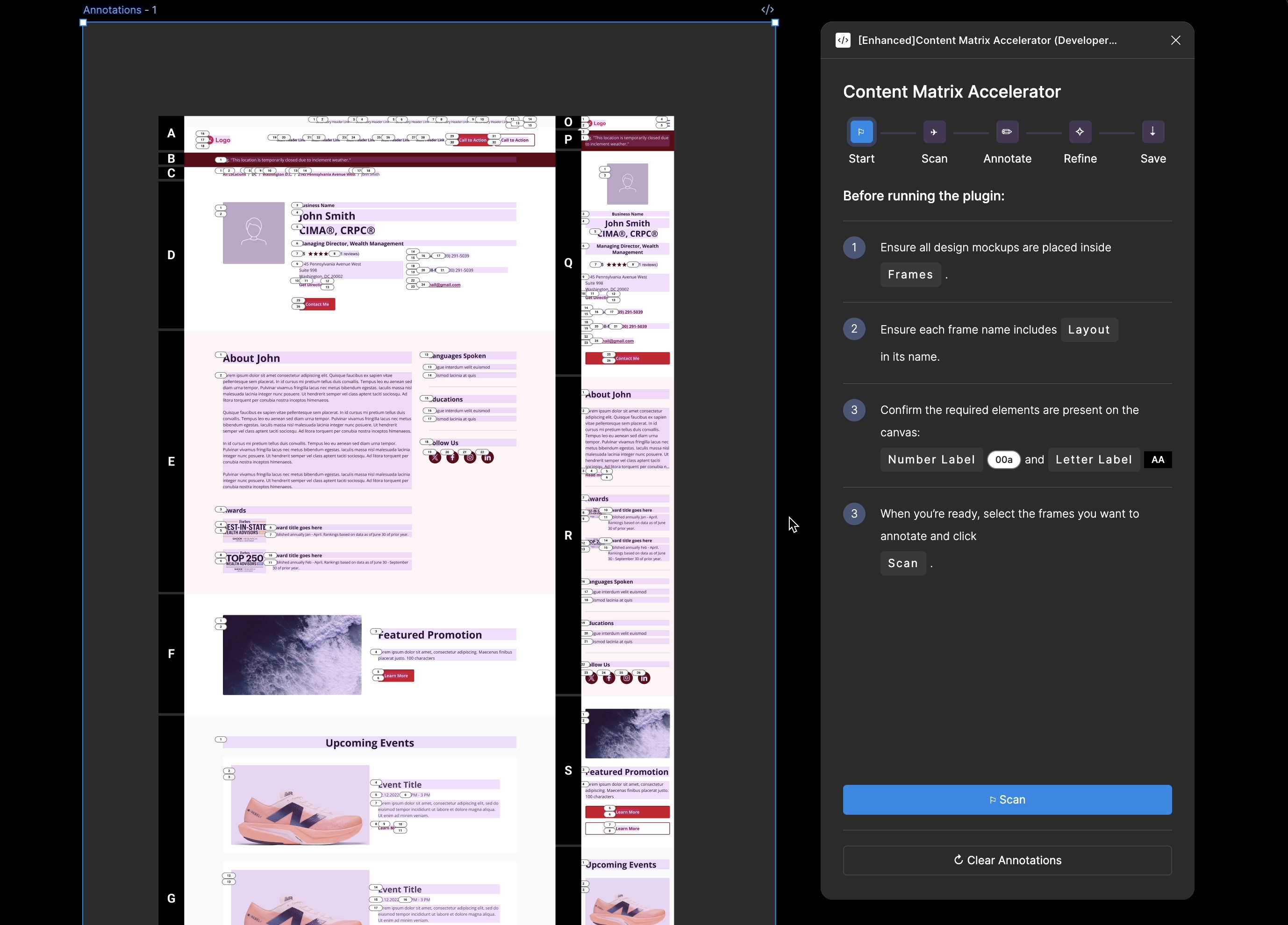
When building websites, defining page content is only part of the work. Teams must also specify extensive content metadata—such as CTA URLs, media alternative text, and the behavior of interactive components. Historically, this metadata was documented manually by designers and project managers, making the process time-consuming, inconsistent, and error-prone.

  • I designed and built a Figma-based tool that automates large portions of this metadata definition while intentionally preserving a human validation checkpoint before generating a final, CMS-ready snapshot of the content

The Users
Busy consultants managing multiple projects
Icon of hotel manager
Designers

Designers define the page UX, including link behavior (jump vs. external) and accessibility requirements such as ALT text for images and icons.

  • Because these decisions originate in design, designers typically create and maintain the metadata spreadsheets.
  • During work-heavy sprints, this manual work often becomes a bottleneck.
Icon of regional manager
Project Managers

Project managers own timelines and requirements.

  • They also make final decisions on how page functionality is implemented in development.
  • They depend on clear, accurate designs and annotations to make those decisions efficiently.
Icon of regional manager
Developers

Developers map metadata fields to page elements and implement the defined behaviors of interactive components.

  • They need to know what content goes where on each page.
  • They need to know what functionalities each interactive element has.
Job to be done #1
Design Scanning

Users need to select specific sections to annotate and generate content fields so that shared sections used across multiple pages do not produce duplicate fields.

  • The tool scans the design to detect sections
  • Then allows users to choose which sections to extract content from, providing granular control.
Job to be done #2
Metadata Definition

Users need to define metadata for page elements so that content fields are accurate, complete, and consistent across the system.

  • The tool scans elements within a section, identifies content types (e.g., images, icons, links)
  • Then it automatically generates annotations based on predefined logic, replacing manual work.
  • To reduce perceived wait time and prevent abandonment, the tool renders annotations progressively and provides real-time status updates.
Job to be done #3
Post-Automation Fine-Tuning

Users need to review and adjust generated annotations so that metadata fields are accurate before being finalized.

  • After annotations are generated, users can refine and edit machine-produced annotations directly on the canvas.
  • To accelerate the clean up, I also added renumbering features that helps quickly identify changes and renumber the annotations.
Job to be done #4
Spreadsheet / Field Generation

Users need to generate a structured spreadsheet of metadata fields so that clients can easily input and manage custom content.

  • The tool generates a reviewable table grouped by section tabs for easy scanning.
  • Minor copy tweaks are also supported for fine-tuning.
  • Once finalized, the table can be copied to the clipboard directly and pasted it into existing Google or Excel Sheets.
The Impact
Reduced Manual Workflow & Increased Consistency
1
Time-saving

The tool reduced manual documentation time by 3 hours.

2
Consistency

The tool also established a standardized process for metadata definition across projects.

3
Transferability

The output mirrors CMS field structures, enabling faster and more predictable handoff to engineering.

Merrill Bank of America Financial Advisor Pages & Dashboard
